

The text in the logos can be changed by opening the Paint dialog box which can be accessed by clicking on this icon  in the top menu. The Paint dialog box is shown below. Notice the column of buttons on the right-hand side. These control the logos on the down tube, seat tube, top tube, chain stays, stem, seatpost and wheels.
Before attempting to change the logos on your BikeCAD model, be sure that the eyeball icon at the top of the Decal text and colors section is enabled. The display of all logos on the bike can be turned on or off by toggling this icon.
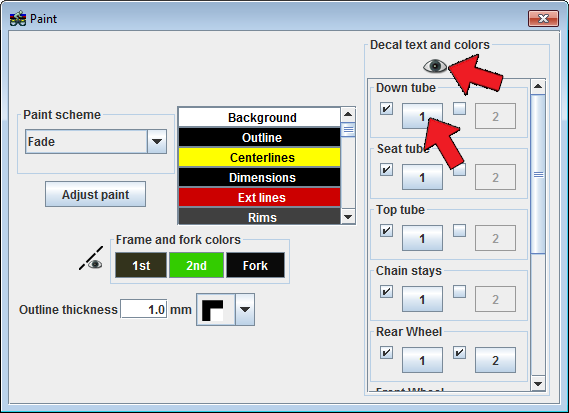
Each entity, such as the down tube for example, can have a total of two logos. To enable or disable one or both of the logos on a particular entity, simply click the check box next to the button labeled either 1 or 2. To change the first down tube logo, click on the button labeled 1, as shown above to launch a dialog box with options for modifying the logo.
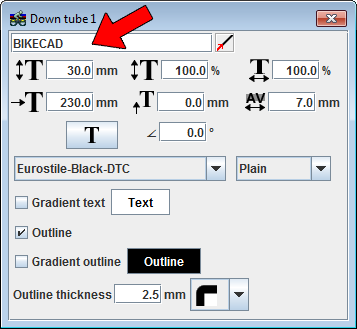
The logo text can be modified in the text field shown on the left.
 toggles the end of the tube from which the edge of the logo is measured.
 mm field controls the height of the logo text
% field controls the height of the logo text as a percentage of the default height.
 field can stretch or contract the width of the letters.
 field controls the offset of the logo along the length of the tube.
 field shifts the text vertically.
 field controls the spacing between the letters.
 button changes the orientation of the letters.
∠ permits fine control of the angle of the letters.
The text can be further modified by changing the font in the font combo box.
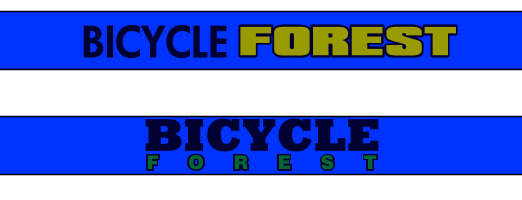
The sample top tubes below illustrate the benefit of having two separate controls for logos on each entity. This allows for the combination of text in different fonts, sizes, colors and orientations to form a single logo.
To represents logos from popular bicycle brands, see the info at: bikecad.ca/brand_logos.