
Main navigation

  • Home
  • BikeCAD Pro
  • BikeCAD Online (Free)
  • Design Archive
  • User Guide
  • Help/ FAQ
  • Forum
  • Glossary
  • Cycling Dingbats
  • Upload a BCAD file
  • Release Notes
  • User Map
  • BikeCAD Pro Owners
  • Contact

User account menu

  • Sign up
  • Log in
Home
Bicycle Design Software

Fork paint scheme

As of BikeCAD version 11.5 it is possible to include the fork in the paint scheme for the frame. This is done by selecting the check box labeled: Include fork in paint scheme in the Paint dialog box as demonstrated below. If this box is not selected, then BikeCAD will present a button to set the color of the fork independent of the paint scheme of the frame.
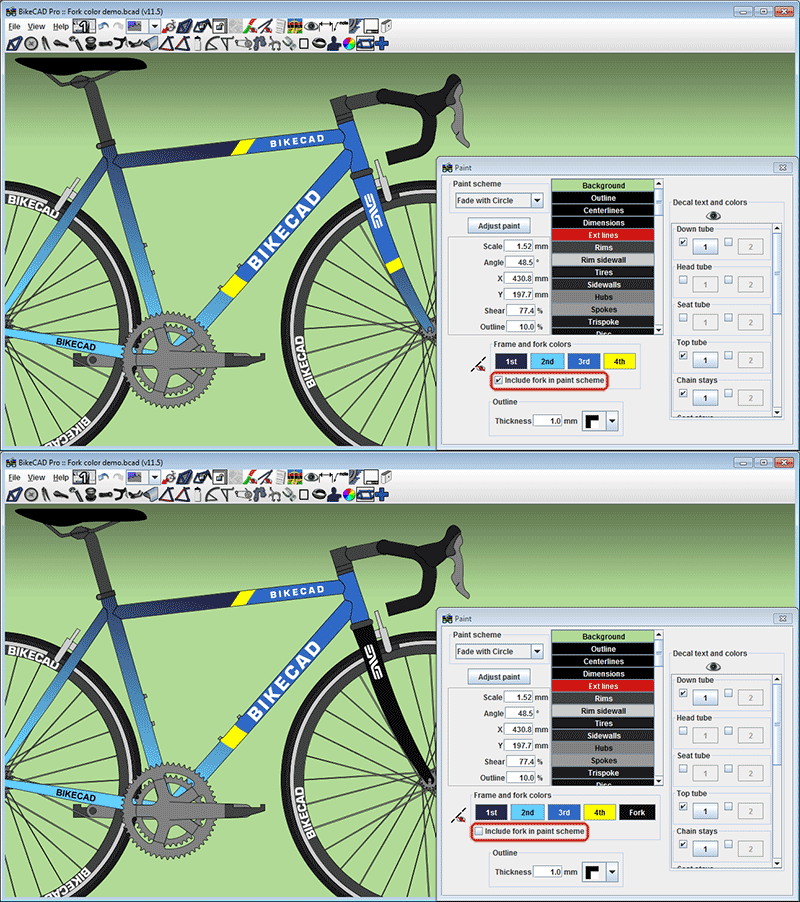
Setting paint scheme for fork

Copyright © 1998 - 2025 The Bicycle Forest Inc. - All rights reserved

Drupal theme by Alaa Haddad