
There are various ways to control the display of components in BikeCAD. One option is to turn on the Display dialog box by selecting View >> Display or by clicking on the eyeball icon  in the top toolbar. The Display dialog box controls the display of all components as well as animation, crosshairs, miters, imported photos, toe overlap, lean angle, problem curves, auxiliary views of seat stays and chain stays, title block, centerlines, dimensions, on-screen notes, a rider, and decals or logos.
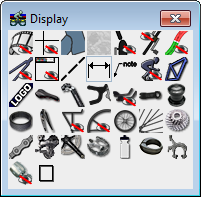
The Photo checkbox will remain disabled until a digital image has been imported or the snapshot feature is used.
Note that many of these icons control several entities at once. Examples include the display icons for dimensions, notes, racks, water bottles, and decals. In these cases, toggling the display off will cause all entities of that type to disappear. However, toggling the display on will not necessarily cause all entities of that type to appear as these entities are generally further controlled by checkboxes. In this example, we can turn off all the logos by toggling that display icon off. Toggling that display icon back on causes most of the logos to appear. However, the logo on the seatpost is still turned off. This is because the checkbox for that particular logo is uncheckecked in the Paint dialog box.
In addition to the display dialog box, each dialog box for a given component has a display icon inside it. In this example, we can control the display of the headset and spacers by toggling the display icons inside the Headset dialog box on or off. We can turn off the display of the seatpost by toggling the display icon inside the seatpost dialog box.
Finally, another method to control the display of components is to use a Display template. For example, we can turn off all components except for the frame and fork by going to File >> Open template >> Display >> Frame and Fork >> Open Template. We can bring most of the components back by selecting File >> Open template >> Display >> Typical >> Open Template. For a more detailed overview of templates see: Using templates in BikeCAD Pro.